
RYLAY
Say it like relay
No service? Stay in touch nearby.
RYLAY lets nearby iPhones talk and text directly, phone to phone. No cell service, Wi-Fi network, data plan or account needed.
Enjoy real-time audio and messaging with the people around you, directly device to device.
Coming soon to the App Store
For iPhone
Voice
Direct, real-time voice connectivity.
Start a private channel, share the passcode and let people in one by one. Then just talk. Everyone hears each other live through AirPods, headphones or the speaker. Need one person instead of the whole crew? Call them directly.
- Passcode channels. Only people with the code can ask to join.
- You approve. The host lets each person in.
- Direct calls. Call one friend nearby.
- Hands free. Auto mute sends your voice while you talk, so wind and engine noise mostly stay out. AirPods, headphones or speaker.
- Range. Up to 100 meters between phones with a direct line of sight. Terrain and obstacles reduce it.
- Encrypted. Voice channels and calls are encrypted between phones.
Made for
Voice connects phones within direct range of each other. On a bike or motorcycle, set up before you roll and follow local laws on headsets and device use.
Messaging
The more the merrier.
Text any friend nearby directly, and send photos too. If they're out of your range, RYLAY can relay your message through other RYLAY users to reach them, or hold it and send it when they're back nearby. Need the whole crew? Post once in a group room.
- Direct messages. Text or send a photo to one friend.
- Friends. See when a friend is nearby. Photos, shared locations and calls only come from friends.
- Relay. Messages travel through other RYLAY users nearby.
- Group rooms. One message, the whole crew.
- Encrypted. Direct messages, photos and group rooms are encrypted for the people they're meant for.
- Private by design. No accounts, no ads and no tracking.
Made for
Messages travel farther when more RYLAY phones are around to pass them along.
What to expect
Know before you use.
RYLAY only works between nearby iPhones that have RYLAY installed. Range is up to 100 meters between phones with a direct line of sight, and less around terrain, buildings, weather and low battery. Keep Wi-Fi turned on in Settings. You don't need to join a network, but with Wi-Fi off, RYLAY can't find people nearby. Everyone in your group should use the latest version of RYLAY. RYLAY is not a safety device and does not contact 911 or emergency services.
How to use RYLAY
Set up takes a minute. Screens are from RYLAY on iPhone.
 1
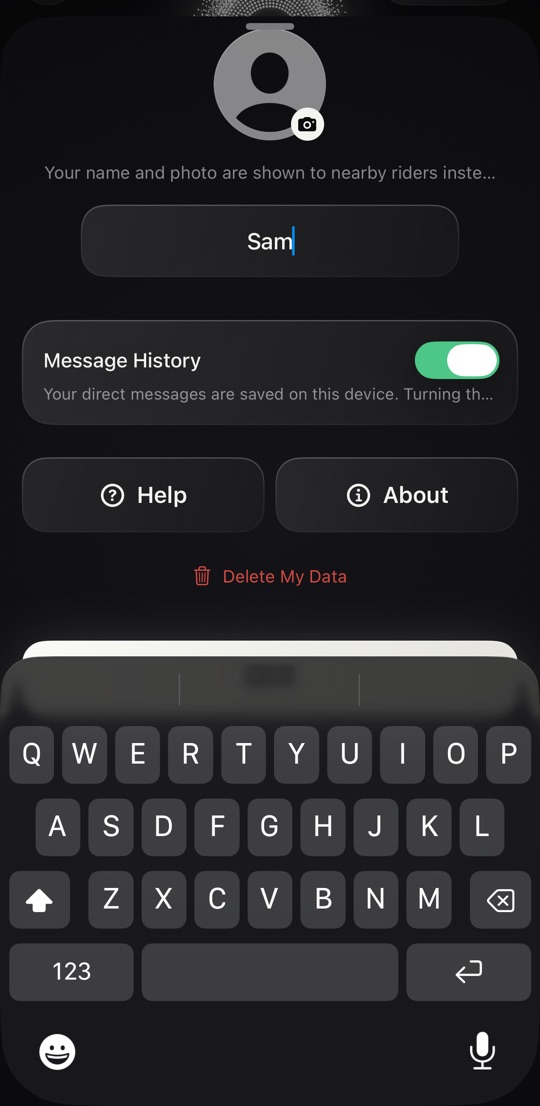
Set your name
Tap the profile button in the top corner and choose the name nearby riders see. You can add a photo too. Both stay on your phone.
 2
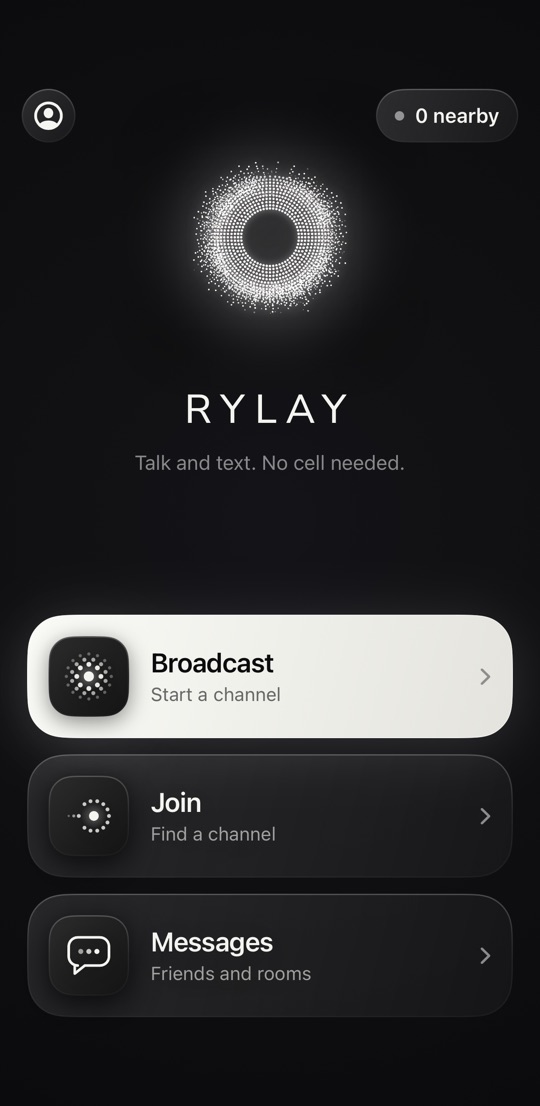
Keep Wi-Fi on
Keep Wi-Fi turned on in Settings. You don't need to join a Wi-Fi network or have cell service, but RYLAY uses Wi-Fi to reach other phones directly. If it's off, RYLAY reminds you. Allow Local Network when RYLAY asks. The home screen has three choices: Broadcast, Join and Messages.
 3
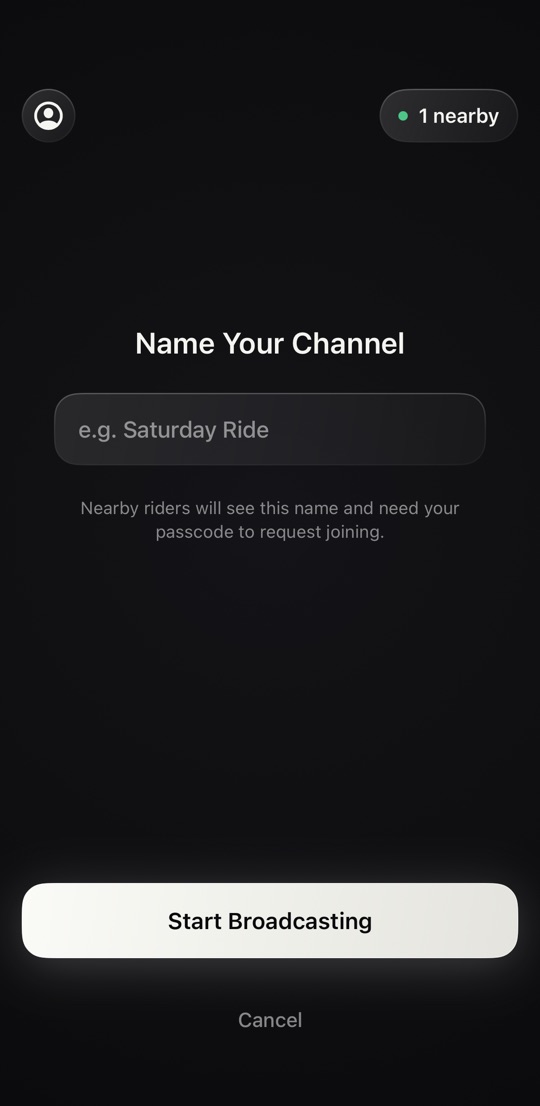
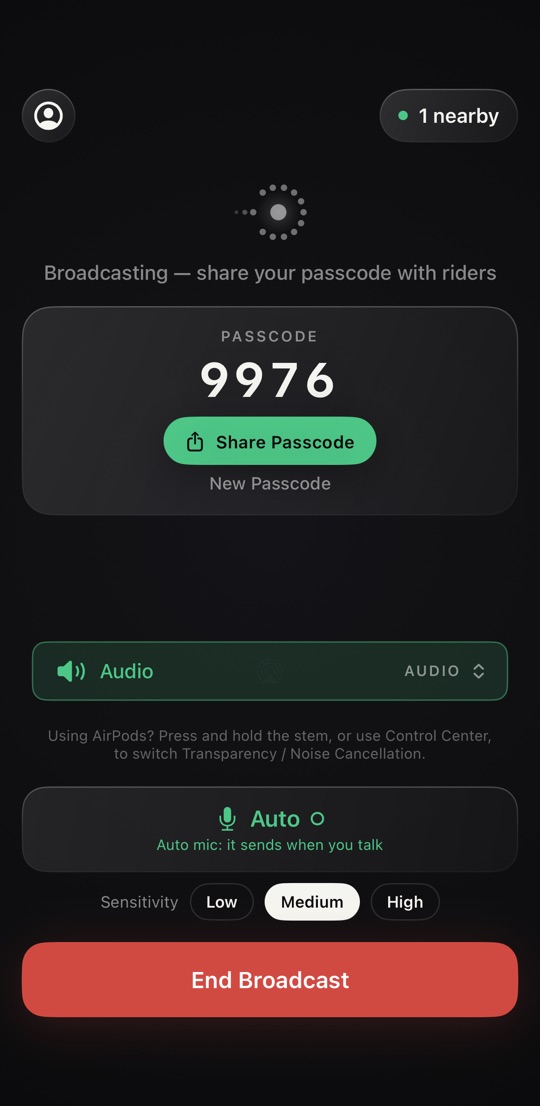
Start a channel
Tap Broadcast, give your channel a name and tap Start Broadcasting. RYLAY shows a passcode. Read it out or tap Share Passcode.
 4
Join a channel
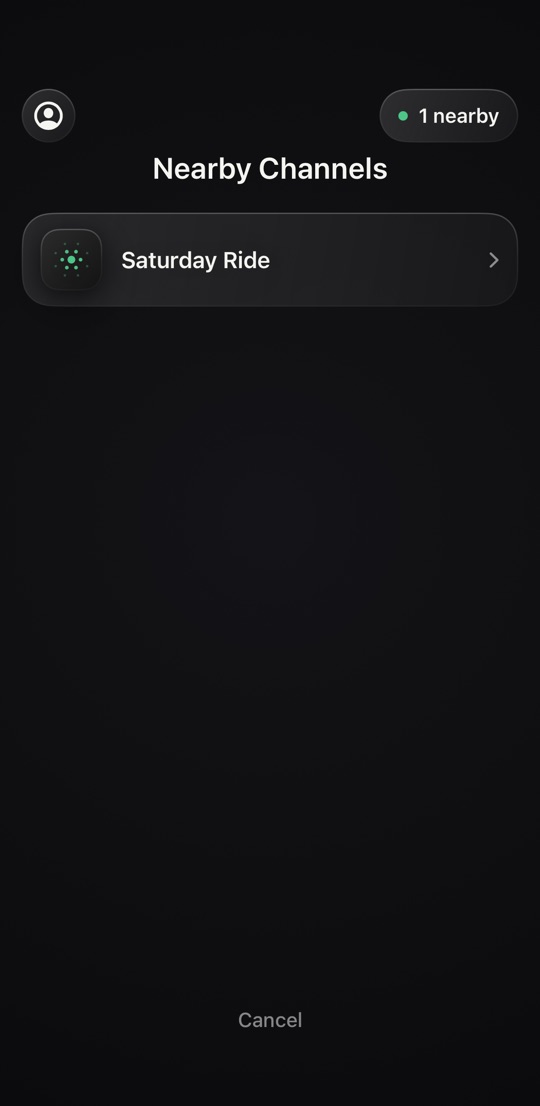
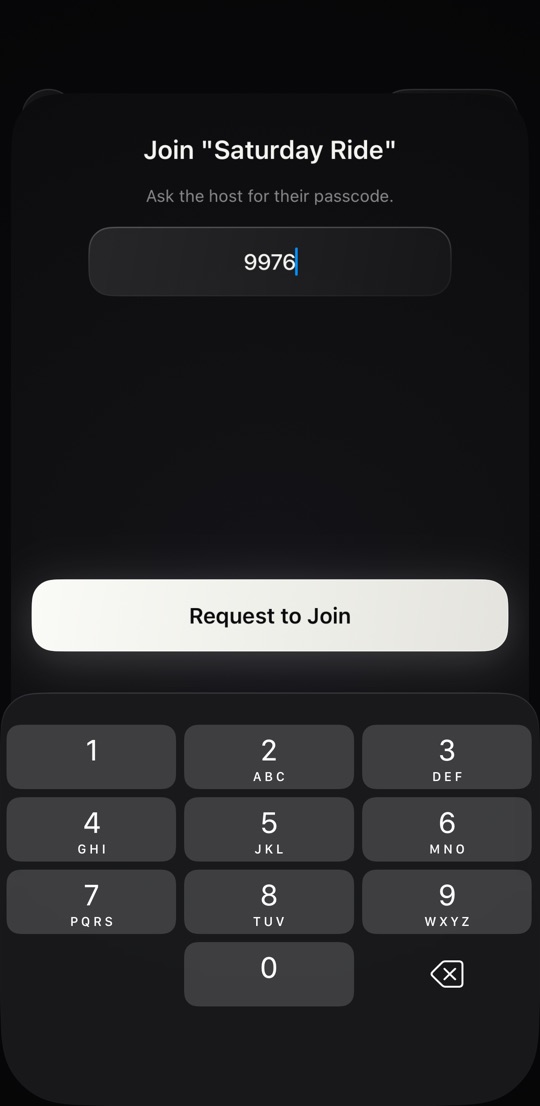
Tap Join and pick the channel from the nearby list. Enter the host's passcode and tap Request to Join.
 5
Let people in
As the host, you see each request to join. Tap Accept to let them in, or Decline.
 6
Talk
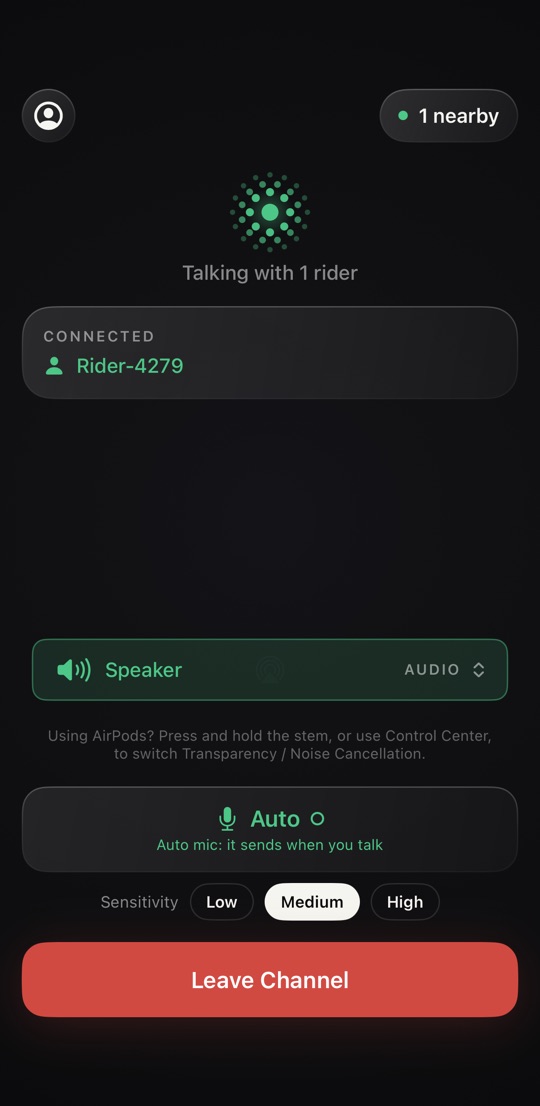
Everyone in the channel hears each other live. Auto mute sends your voice while you talk. Tap the mic button to mute, or hold it to switch between Auto and Live Mic. Choose speaker, AirPods or headphones from the audio button. Tap Leave Channel when you're done.
 7
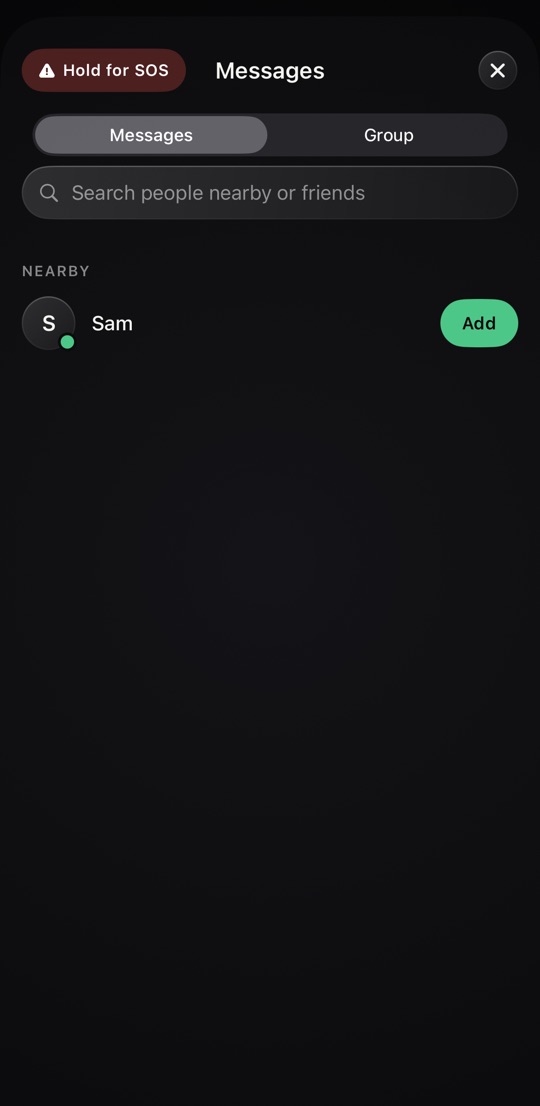
Message friends
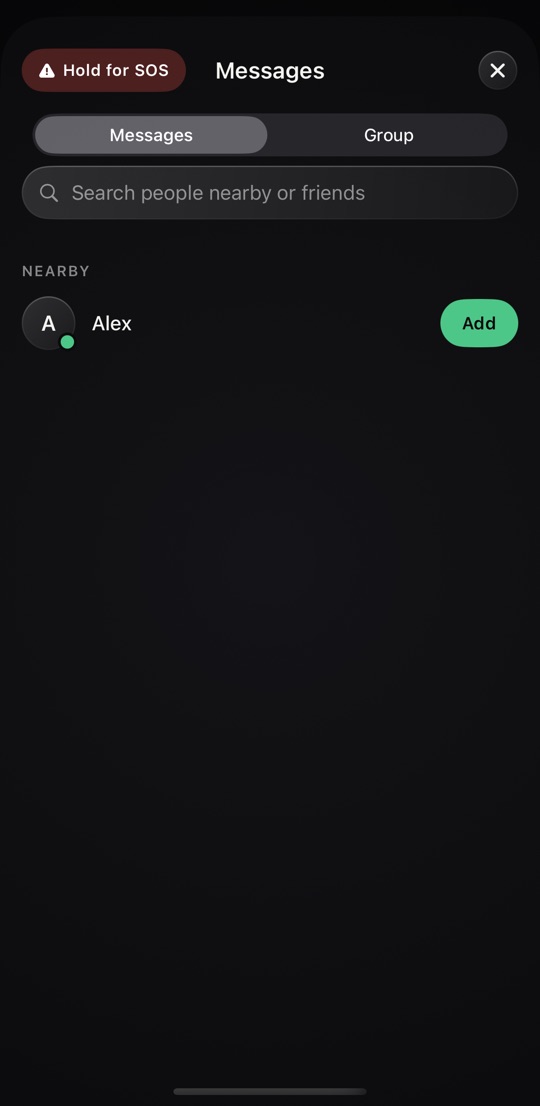
Open Messages to see who's nearby. Tap Add to make someone a friend, then text, send photos, share your location or call them. Use Group for rooms with the whole crew.
Support
Questions, feedback or ideas? We'd love to hear from you.
How do you pronounce RYLAY?
REE-lay, just like relay. Messages relay from phone to phone to reach your group.
How do I start talking to my group?
One person taps Broadcast, names the channel and shares the passcode. Everyone else taps Join, enters the passcode and waits for the host to let them in.
Why can't I find a channel?
Turn on Wi-Fi in Settings (you don't need to join a network), and allow Local Network access (Settings → RYLAY). The host must be broadcasting. Range is up to 100 meters between phones with a direct line of sight, and less around terrain, buildings and other obstacles.
Who can message me?
Anyone nearby running RYLAY can send you a message. If they're not your friend, it arrives as a message request you can Accept or Block. Photos, shared locations and calls only come from friends.
How do I block or report someone?
Press and hold their message, then choose Block or Report. Blocking hides everything from them right away. Report also sends us the message details by email.
Does SOS reach 911?
No. SOS only reaches other nearby phones running RYLAY. Always contact emergency services directly when you need them.
How do I delete my data?
Everything RYLAY stores is on your phone. Go to Settings and tap Delete My Data to erase it all, like a fresh install. Deleting the app does the same. We have no account or server data to delete.
Privacy Policy
We don't collect your data. RYLAY has no server, no accounts, no analytics and no ads. The app works between your phone and nearby phones, and it doesn't send your messages, calls, location or contacts to us or to any third party.
What the app uses on your phone
- Nickname and profile photo. A name and optional photo you choose, shown to people you connect with. Stored only on your phone.
- Microphone. Used only during a voice channel or a call. Audio goes, encrypted, to the phones you're talking with. RYLAY never records or stores it.
- Wi-Fi, local network and Bluetooth. Wi-Fi and the local network are used to find and connect directly to nearby phones running RYLAY. You don't need to join a network. If a friend's phone is nearby but locked, with RYLAY in the background, RYLAY may send a Bluetooth alert that a message is waiting. This may not work every time, and calls do not work this way.
- Location, only when you choose to share it. An SOS can include your current location. You can also share your location with a group or a friend for a set time (1 hour, 4 hours or until midnight). While sharing is on, your location updates about every 25 seconds, encrypted and designed so only that group or friend can see it. It stops when the time ends, when you stop it or when you leave. RYLAY doesn't save shared locations on any phone.
- Nearby Interaction. Locate shows the distance and direction to a friend using the phones' Ultra Wideband chips, only while the Locate screen is open. RYLAY doesn't store it.
- Photos. Photos you choose to send go, encrypted, to that friend only. A received photo is saved to your library only when you tap Save.
- Notifications. Optional alerts for incoming calls, messages and message requests. They're created on your phone.
What nearby phones can see
Voice, calls, direct messages, group room messages and shared locations are encrypted and designed so only the intended people can read them. Everyone in a group room can read that room's messages, so share accordingly. Anyone you communicate with can still save or share what you send them, for example with a screenshot. SOS alerts are the exception: they're meant for everyone nearby, so any phone that relays one can read it, including a location you attach, similar to how a radio relay hears what it repeats.
When your phone passes a message along for someone else, it handles encrypted data it cannot read (except SOS alerts, which are not encrypted). It does not keep that data, and RYLAY has no servers, so nothing is sent to Point Rider.
What's stored, and how to delete it
Your nickname, profile photo, friends list, blocked list, encryption key (in the iPhone Keychain) and, if Message History is on, your direct messages and photos stay on your phone. Turn off Message History to delete saved conversations. Tap Delete My Data in Settings, or delete the app, to remove everything. We keep no copies.
Information that can reach us
- Emails. If you email us or report a message, we receive what you choose to send, including your email address. We use it only to respond and to act on reports.
- Apple diagnostics. If you choose to share analytics with app developers in your iPhone settings, Apple may send us anonymous crash reports and usage statistics. You can turn this off anytime in Settings → Privacy & Security → Analytics & Improvements.
Children
RYLAY is not for children under 13, and we don't knowingly collect personal information from them.
Changes and contact
If this policy changes, we'll update this page and the date above. Questions: [email protected]. RYLAY is published by Point Rider LLC, Washington State, USA.
Terms of Use
By using RYLAY you agree to these terms and to Apple's Standard License Agreement.
13 and older
You must be at least 13 years old to use RYLAY. If you are under 18, a parent or guardian must agree to these terms.
Not a safety device
RYLAY does not replace 911, marine VHF radio, avalanche beacons or other safety equipment. Do not rely on it in an emergency. SOS reaches only nearby RYLAY phones and does not contact emergency services.
No guaranteed range or delivery
Connections, calls and delivery of messages, locations and SOS alerts depend on distance, terrain, battery, settings and device conditions, and may fail or be delayed.
Your phone may help carry messages
RYLAY is built so nearby phones can pass messages along to reach people who are out of direct range. While RYLAY is running, your phone may pass along encrypted messages and SOS alerts for other people. This may use some of your battery, Bluetooth and Wi-Fi, but does not use your cellular data. Your phone cannot read direct messages meant for other people, or messages from group rooms you have not joined, and it does not keep them. SOS alerts are different: they are not encrypted, so any phone that passes one along may be able to read it. A message may be delayed, may not arrive, or may not be passed along at all. Closing RYLAY stops your phone from passing messages along.
Outdoor activities are risky
Riding, driving, motorsports, skiing, hunting, fishing, boating and similar activities carry risk of injury or death. You are responsible for your own safety and choices.
Zero tolerance for abuse
Don't post harassment, threats, hate speech, sexual content, illegal content or spam, or impersonate anyone. Messages from someone who isn't your friend arrive as a request you can Accept or Block. To report abuse, use Report in the app or email [email protected]. We review reports and may remove access for abusive users. You are responsible for what you send, and we don't monitor or control messages between people.
Follow the law
You must use RYLAY in compliance with all applicable local, state and federal laws.
Stay focused
Don't let the app distract you while riding, driving or operating equipment, and follow the laws where you are.
No warranties
RYLAY is provided "as is" and "as available," without warranties of any kind, express or implied, including merchantability, fitness for a particular purpose and non-infringement.
Limitation of liability
To the fullest extent the law allows, Point Rider LLC and its members, employees and partners are not liable for any injury, death, loss or damage, or any indirect, incidental, special or consequential damages, arising from using or being unable to use RYLAY, including failed, delayed or undelivered messages, calls, locations or SOS alerts. Our total liability for any claim is limited to the amount you paid for the app, if any.
Changes
We may update these terms. Continuing to use RYLAY after an update means you accept the new terms.
Governing law and contact
These terms are governed by the laws of Washington State. Questions: [email protected].